
New
Figma Image Compressor
Bulk Optimize & Export Images from Figma in Seconds
PixelLift is a Figma plugin that exports, optimizes, renames, and delivers your design assets. Get the right format, right name, production-ready.
- Start Compressing in Figma Now
Try for Free . Cancel anytime
- Bulk Export in AVIF & WebP
- Reduce File sizes up to 95%
- AI-Powered Rename
- Why Developers and Designers Choose PixelLift?
PixelLift does Everything Figma's Native Export Should Have Done
Figma’s default export gives you a file. PixelLift gives you the right file. Compressed, renamed, in the format your site actually needs.
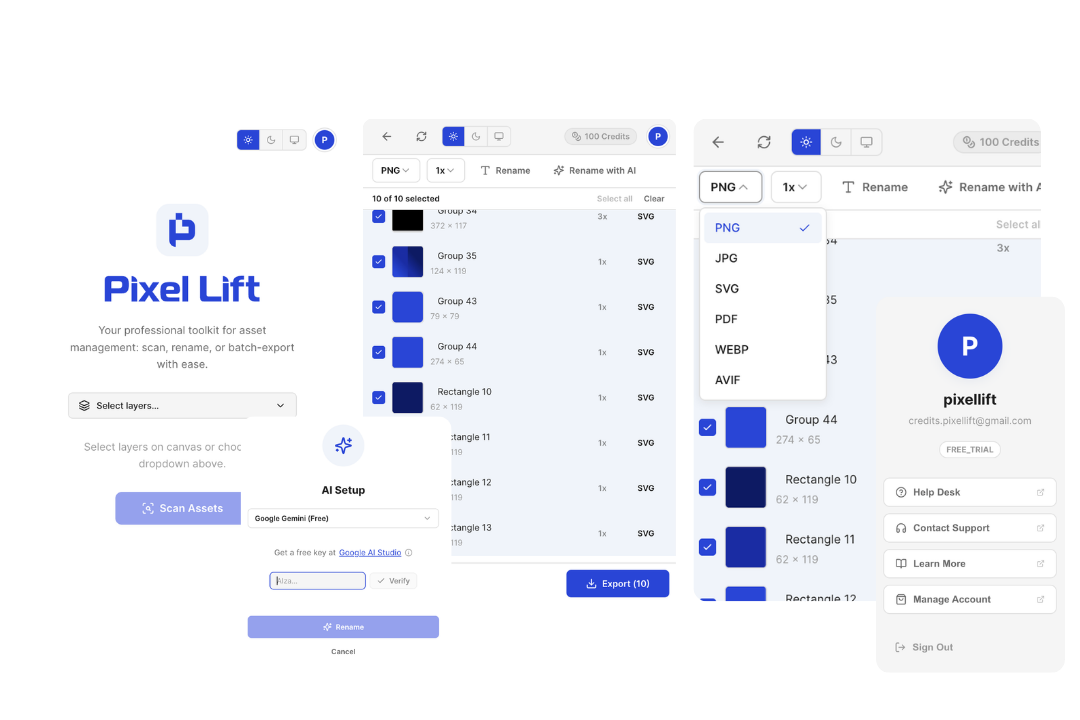
Auto-detect assets in any selection
Select a frame — Pixelift walks the layer tree and flags every exportable image and vector.
AI rename
Goodbye Frame 427. Names that describe what's in the image, ready for your repo.
WebP & AVIF, automatically
Every export is compressed into modern formats — same pixels, a fraction of the bytes.
One-click background removal
Clean cutouts on export — no round-trip through another tool.
Batch export
Hundreds of assets in one run, with live progress.
Send assets anywhere
Download a ZIP, or push straight to your server, bucket, or CDN over the API.
- How It Works
Compress and Export Figma Images in Three Steps
01. Select Your Layers
Grab one frame or a whole page. Pixelift auto-detects every exportable asset inside.
02. Review names & formats
AI suggests clean file names; pick WebP, AVIF, or SVG and flip on background removal where needed.
03. Export in One-Click
One click sends the optimized batch to a ZIP, your server, or your CDN. No Optimizer tool required.
- Pricing Plans
Start FREE, Upgrade When you Need More!
Simple credits-based pricing plans. Get 3 months-free on annual plans.
“Ran it on a 40-image project the first day. Everything came out named, compressed, and ready to upload. It seriously took me just a couple of minutes.”
Alex Murton
Freelance Developer
Free
Enough credits to properly evaluate on a real project. No credit card required.
- Free export credits to start
- All core features included
- WebP & AVIF export
$0
Solo
For developers and designers who export on every project. Starting from $29/one time payment.
- Everything in Free
- Bulk Exports
- AI-powered renaming
- Premium Support
$29
- FAQ's
Everything You Want to Know Before You Install
Does PixelLift work inside Figma or is it a separate app?
PixelLift is a Figma plugin. It runs entirely inside Figma, in your browser or desktop app. There is no separate login, no new dashboard, and nothing to install outside of Figma. Open your file, run the plugin, and export.
Can I export WebP and AVIF directly from Figma using PixelLift?
Yes. PixelLift adds WebP and AVIF export to Figma natively. Figma does not support these formats on its own. With PixelLift, you select your layers, choose WebP or AVIF, and export. Files come out up to 80% smaller than PNG with no visible quality loss.
Does PixelLift compress images automatically or do I need to set it manually?
Compression is built in and happens automatically on export. You can also control quality and scale per export if you need to fine-tune output for specific use cases like retina screens or print.
Can I bulk export multiple layers at once?
Yes. Select 50 or more layers in one action and export them all at once. PixelLift scans every nested layer inside your selection so nothing gets missed, no matter how deep your Figma file is structured.
Will PixelLift rename my files automatically?
You can rename files manually inside the plugin, apply a prefix or suffix across all exports at once, or use AI-powered renaming. The AI looks at what is in each image and suggests an intelligent name. No more “Frame 1234” or “Rectangle 45” in your exports folder.
Is PixelLift free to use?
Yes. PixelLift is free to install from the Figma Community. Install it, open any Figma file, and start exporting in the format and naming convention you actually need.
Got more questions? Visit our Knowledgebase or Contact Us.
- Get Started for FREE
Stop working around Figma. Start shipping with PixelLift.
Every project you ship from here has correctly named, compressed, production-ready images. Install PixelLift from Figma Community and run it on your next export today.
- Start Compressing in Figma Now
Try for Free . Cancel anytime